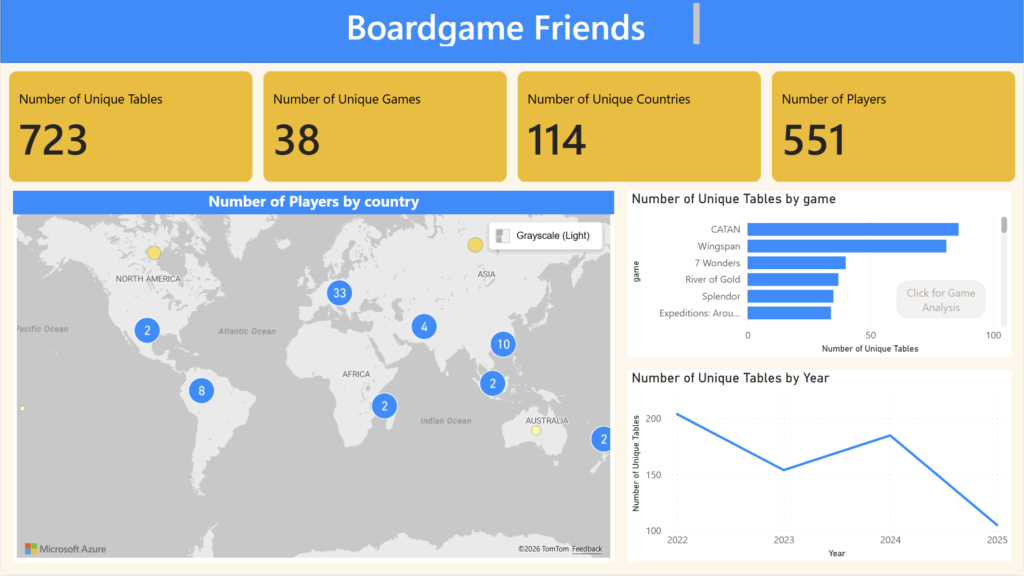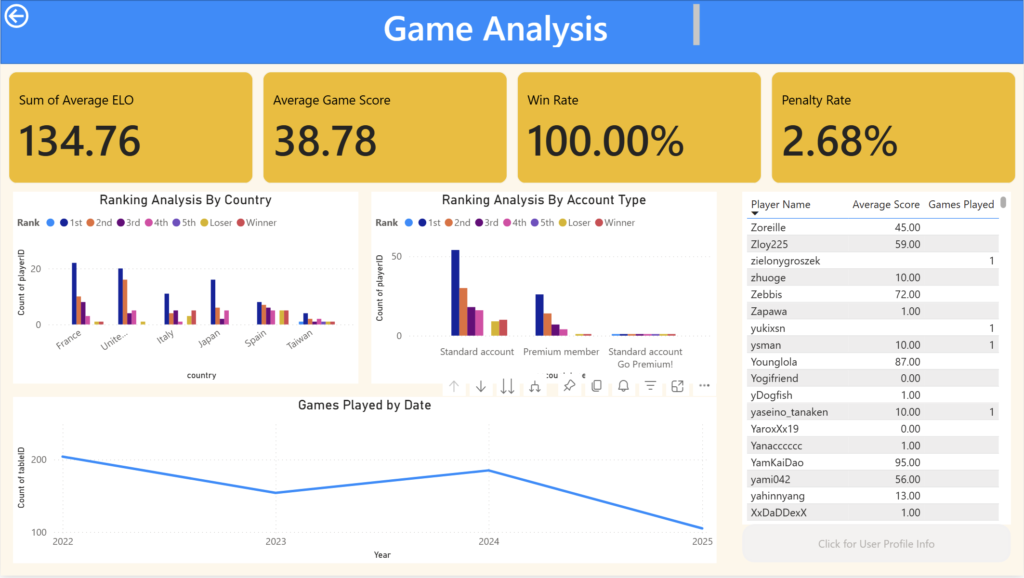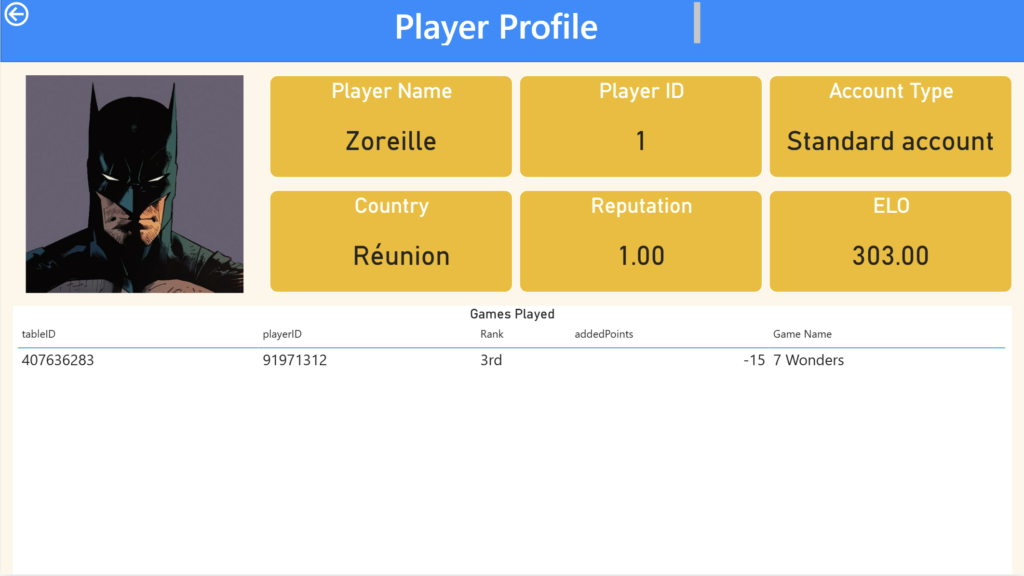
I love playing boardgames and I found it fun to make a dashboard of all the games I played. For this project, I used selenium to scrape data from my boardgamearena.com account and then I used PowerBI to visualize the data.
Data Scraping With Selenium
First, we will import the necessary libraries.
from selenium import webdriver
from selenium.webdriver.common.by import By
from time import sleep
from selenium.common.exceptions import TimeoutException
from selenium.webdriver.support.wait import WebDriverWait
from selenium.webdriver.support import expected_conditions as EC
import pandas as pd
Then, we connect the chrome web driver
cService = webdriver.ChromeService(executable_path="./chromedriver/chromedriver")
driver = webdriver.Chrome(service=cService)
wait = WebDriverWait(driver, 10)
wait_alert = WebDriverWait(driver, 5)
After that, I used my credentials for boardgamearena.com and then connected to the website and use selenium to log in.
email= "username"
password= "password"

url = "https://en.boardgamearena.com/"

#open url
driver.get(url)

#press log in button
button = WebDriverWait(driver, 10).until(
    EC.element_to_be_clickable((By.LINK_TEXT, "log in")) # Replace 'myButton' with the actual ID
)
button.click()

#Type in the username and password
driver.find_element(By.XPATH, "//input[contains(@placeholder,'Email or username')]").send_keys(email)
button = WebDriverWait(driver, 10).until(
    EC.element_to_be_clickable((By.LINK_TEXT, "Next")) # Replace 'myButton' with the actual ID
)
button.click()
driver.find_element(By.XPATH, "//input[contains(@placeholder,'Password')]").send_keys(password)

#press final log in button
button = WebDriverWait(driver, 10).until(
    EC.element_to_be_clickable((By.LINK_TEXT, "Login")) # Replace 'myButton' with the actual ID
)
button.click()

button = WebDriverWait(driver, 10).until(
    EC.element_to_be_clickable((By.LINK_TEXT, "Let's play!")) # Replace 'myButton' with the actual ID
)
button.click()
Now, we use selenium to open the profile tab and open the game history section.
button = WebDriverWait(driver, 10).until(
    EC.element_to_be_clickable((By.LINK_TEXT, "View my profile")) # Replace 'myButton' with the actual ID
)

button.click()

button = WebDriverWait(driver, 10).until(
EC.element_to_be_clickable((By.ID, "pageheader_lastresults")) # Replace 'myButton' with the actual ID
)
button.click()
In the game history section, we would need to keep pressing the expand button at the bottom of the screen before we can scrap all the games. The code below shows how selenium should keep pressing on the expand button until there we see a tag with ID “head_infomsg_1”
atEnd= False

while not atEnd:
    try:
        wait.until(EC.element_to_be_clickable(("id", "board_seemore_r"))).click()
    except:
        ("Reached Error at pressing button")
    try:
        print("got in here")
        wait_alert.until(EC.presence_of_element_located((By.ID, "head_infomsg_1")))
        atEnd=True
        print("at end is tru")
    except:
        print("Not yet at the bottom")
After all the games have been revealed, we collect all of the game date by scraping them through tags.
board_posts = driver.find_element(By.ID,"boardposts_r")
posts = board_posts.find_elements(By.CLASS_NAME,"postmessage")
games=[]
ranks=[]
players=[]
tables=[]

for post in posts:
    try:
        table_info= post.find_element(By.TAG_NAME,"a").get_attribute('href')
        game_name=post.find_element(By.CLASS_NAME,"gamename").text

        ranking_info = post.find_elements(By.CLASS_NAME,"board-score-entry")

        for rank in ranking_info:
            tables.append(table_info)
            games.append(game_name)
            ranks.append(rank.text)
            #durations.append(duration)
            #dates.append(date)
            player= rank.find_element(By.CLASS_NAME,"playername").get_attribute('href')
            players.append(player)

            #print("entry: ",table_info,game_name,rank.text,player, sep="*")

    except Exception as e:
        print(e)
        print("not a valid game")
We then store these data into a dataframe and save it a csv file.
data= {"game": games, "rank":ranks,"player":players,"table":tables}
df=pd.DataFrame(data)
df.head()
User Information
I also wanted to analyze not only the game table data, but also the players that I play with. Therefore, for each game that I play, I want to go through each player in that game and collect data about them.
First, I will import the necessary libraries.
from selenium import webdriver
from selenium.webdriver.common.by import By
from time import sleep
from selenium.common.exceptions import TimeoutException
from selenium.webdriver.support.wait import WebDriverWait
from selenium.webdriver.support import expected_conditions as EC
import pandas as pd
Before we continue with the webscraping, let us view the dataframe from the last section.
df = pd.read_csv('boardgame_raw_part2.csv')
df.head()
If we do some quick data exploration, we can see that there about 551 unique players (including myself) in my boardgame arena history.
player_set = set(df["player"])
len(player_set)
Then I opened the new tab and then tried logging in and going into the home page.
cService = webdriver.ChromeService(executable_path="./chromedriver/chromedriver")
driver = webdriver.Chrome(service=cService)
wait = WebDriverWait(driver, 10)
wait_alert = WebDriverWait(driver, 5)

#open url
driver.get(url)

button = WebDriverWait(driver, 10).until(
    EC.element_to_be_clickable((By.LINK_TEXT, "log in")) # Replace 'myButton' with the actual ID
)


button.click()

wait.until(EC.presence_of_all_elements_located((By.XPATH, "//input[contains(@placeholder,'Email or username')]")))
driver.find_element(By.XPATH, "//input[contains(@placeholder,'Email or username')]").send_keys(email)

button = WebDriverWait(driver, 10).until(
    EC.element_to_be_clickable((By.LINK_TEXT, "Next")) # Replace 'myButton' with the actual ID
)

button.click()

wait.until(EC.presence_of_all_elements_located((By.XPATH, "//input[contains(@placeholder,'Password')]"))).send_keys(password)


button = WebDriverWait(driver, 10).until(
    EC.element_to_be_clickable((By.LINK_TEXT, "Login")) # Replace 'myButton' with the actual ID
)
button.click()

button = WebDriverWait(driver, 10).until(
    EC.element_to_be_clickable((By.LINK_TEXT, "Let's play!")) # Replace 'myButton' with the actual ID
)
button.click()
Now, using all the player profile links, we go through each player page and then collect all the data and store it in a dataframe.
wait = WebDriverWait(driver, 10)

player_ids=[]
player_names=[]

ages=[]
languages=[]
countries=[]
last_activities=[]
membership_starts=[]
account_types=[]
ELOs=[]
games_played=[]
friends=[]


for player in player_set:
    driver.get(player)
    try:
        wait.until(EC.presence_of_element_located((By.CLASS_NAME, "pagesection__content")))
        player_info_element = driver.find_element(By.CLASS_NAME,"pagesection__content")
        player_name=driver.find_element(By.ID,"player_name").text
        ELO =driver.find_element(By.CLASS_NAME,"value").text
        games=driver.find_element(By.ID,"pageheader_lastresults").text
        friends_number=driver.find_element(By.ID,"pageheader_friends").text

        player_infos = player_info_element.find_elements(By.CLASS_NAME,"row-value")

        info_list=[]
        info_list.append(player)
        info_list.append(player_name)
        for player_info in player_infos:
            info_list.append(player_info.text)
        info_list.append(ELO)
        info_list.append(games)
        info_list.append(friends_number)

        player_ids.append(info_list[0])
        player_names.append(info_list[1])

        ages.append(info_list[2])
        languages.append(info_list[3])
        countries.append(info_list[4])
        last_activities.append(info_list[6])
        membership_starts.append(info_list[7])
        account_types.append(info_list[11])
        ELOs.append(ELO)
        games_played.append(games)
        friends.append(friends_number)

        print(info_list, sep="**")
    except:
        print("player does not exist")
player_info_dictionary = {"player_id":player_ids,"player_name":player_names,"age":ages,"language":languages,"country":countries,"last_activity":last_activities,"membership_start":membership_starts,"account_type":account_types,"reputation":ELOs, "number_games_played":games_played,"number_friends":friends }
player_info_df = pd.DataFrame(player_info_dictionary)
player_info_df.head()
Table Data
Now, we also have to collect the table data for each game. Therefore, just like the user data, we wil go through the game dataframe and extract more data about that game through the table ID.
Let us import the necessary libraries for this step.
from selenium import webdriver
from selenium.webdriver.common.by import By
from time import sleep
from selenium.common.exceptions import TimeoutException
from selenium.webdriver.support.wait import WebDriverWait
from selenium.webdriver.support import expected_conditions as EC
import pandas as pd
Now, let´s import the game dataframe csv file.
df_tables = pd.read_csv("boardgame_raw_part2.csv")
df_tables.head()
With some quick data exploration, we can see that there are over 723 unique tables.
tables = set(df_tables["table"])
len(tables)
Now we go through each table and collect the data.
wait = WebDriverWait(driver, 10)

table_ids=[]
durations=[]
dates=[]
players_data=[]


for table in tables:
    driver.get(table)
    try:
        wait.until(EC.presence_of_element_located((By.ID, "estimated_duration")))
        duration = driver.find_element(By.ID,"estimated_duration").text
        creationTime = driver.find_element(By.ID,"creationtime").text

        result_box = wait.until(
            EC.presence_of_element_located((By.ID, "game_result"))
        )

        # all rows (1st, 2nd, 3rd, …)
        rows = result_box.find_elements(
            By.XPATH, ".//div[contains(@class,'score-entry')]"
        )

        table_ids.append(table)
        durations.append(duration)
        dates.append(creationTime)

        for row in rows:
             # --- player name + profile link ---
            name_link = row.find_element(
                By.XPATH, ".//div[contains(@class,'name')]//a[contains(@class,'playername')]"
            )
            player_name = name_link.text.strip()
            player_url = name_link.get_attribute("href")

            # --- game score (17, 13, 12 …) ---
            score_div = row.find_element(
                By.XPATH, ".//div[contains(@class,'score')]"
            )
            # text is usually like "17 ★", we only want the first token
            score_for_game = score_div.text.split()[0]

            try:
                winpoints_span = row.find_element(
                    By.XPATH, ".//div[contains(@class,'winpoints')]"
                     "//span[starts-with(@id,'winpoints_value')]"
                )
                added_points = winpoints_span.text.strip()   # e.g. "+22"
            except Exception:
                added_points = None  # in case there is no rating change

            # --- new rating (123, 115, …) ---
            try:
                new_rank_span = row.find_element(
                    By.XPATH, ".//span[contains(@class,'gamerank_value')]"
                )
                new_rating = new_rank_span.text.strip()
            except Exception:
                new_rating = None

            player={
                "table":table,
                "player_name": player_name,
                "player_url": player_url,
                "game_score": score_for_game,
                "added_points": added_points,
                "new_score": new_rating,
            }
            players_data.append(
                player
            )
            print(player)


        print(table,creationTime, duration, sep=" ** ")

    except Exception as e:
        print(e)
Then, we turn all these data into a dataframe.
data_table= {"table": table_ids, "duration":durations,"date":dates}
df_table=pd.DataFrame(data_table)
df_table.head()
Exporting Table and Player Dataframes
So that we can make a visualization with PowerBI, we will have to store the data into csv files.
df_table.to_csv("table_data_raw.csv", index=False)
df_players.to_csv("players_tables_data_raw.csv", index=False)
Dashboard
Here are some screenshots of the PowerBI Report that I made.